Posts

Showing posts with the label Applet

Program to design an applet which draws a circle (having color BLUE) inside a triangle (having color YELLOW)

Image
Given program will draw a circle inside a triangle. The color of circle is "blue" and triangle having color "yellow". To fill circle with respective colours first we have to set the colour using  setColor(Color c)  method of  Graphics  class and then use the fillPolygon() and fillOval( )  method. The  fillPolygon( )  method Fills a closed polygon defined by arrays of x and y coordinates.

Program to create a simple mini paint application

Image
In this program, we will create a simple mini paint application using Frame class. We have to implement two types of events here: Mouse event and Key event. To use this program you have to use numpad keys on keyboard. The following keys are used for specific purpose:

Program to demonstrate the Mouse events using Applet

Image
In this program, we have to implement Mouse events. An event which indicates that a mouse action is occurred in a component. This event is used both for mouse events (enter, click, press, release, exit) and mouse motion events (moves, drags). 

Program to use MouseListener interface and its methods.

Image

Program to draw a different shapes in Applet window

Image
This program will display the different shapes in Applet window. PROGRAM import java.awt.event.*; import java.applet.Applet; import java.awt.Graphics; public class GraphicsExcercise extends Applet { public void paint(Graphics g) { // For rounded rectangle and filled oval g.drawRoundRect(20,20,140,100,10,10); g.fillOval(65,43,50,50); // For triangle g.drawLine(200,20,200,120); g.drawLine(200,20,300,120); g.drawLine(300,120,200,120); // For smiley g.drawOval(20,150,150,150); // For head g.fillOval(50,190,15,15); // Left Eye g.fillOval(120,190,15,15); // Right Eye int x[] = {95,85,106,95}; int y[] = {215,234,234,215}; g.drawPolygon(x, y, 4); // Nose g.drawArc(55,225,78,50,0,-180); // Smile g.drawLine(50,256,60,246); g.drawLine(128,245,139,256); // For diamond int x1[] = {203,252,301,252,203}; int y1[] = {225,176,225,274,225}; g.fillPolygon(x1, y1, 4); } } /* <applet code="GraphicsExcercise.class" width...

Program to draw a text at random location in random color

Image
This program will display the text at random location with random colours.

Program to demonstrate use of Thread in an applet to show multithreading in Java

Image
This program makes the use of Runnable interface in Applet class to show the mutithreading in Java. The output of this program is that the string "MutiThreading In Java" will move from top to bottom with a delay of 50ms. PROGRAM import java.applet.Applet; import java.awt.*; public class AnimationUsingThread extends Applet implements Runnable { Image img; Thread t; Graphics g,g1; public void init() { img = createImage(400,400); g = getGraphics(); g1 = img.getGraphics(); t = new Thread(this); t.start(); } public void run() { Font f = new Font("Cambria",Font.BOLD,16); g1.setFont(f); for(int i=1;i<=190;i+=3) drawme("MultiThreading In Java",20,i); } void drawme(String s,int x,int y) { g1.setColor(Color.black); g1.fillRect(0,0,400,400); g1.setColor(Color.white); g1.drawString(s,x,y); g.drawImage(img,0,0,this); try { Thread.sleep(50); }catch(Exception ee){ } } } /* <applet code="AnimationUsin...

Program to display table of 1 to 10 on applet

Image
This Java example displays the table of 1 to 10 numbers on applet. PROGRAM import java.applet.Applet; import java.awt.*; public class Table1To10Applet extends Applet { public void paint(Graphics g) { setBackground(Color.cyan); setForeground(Color.red); Font f=new Font("Cambria",Font.BOLD,16); g.setFont(f); int x=20,y=20; for(int i=1;i<=10;i++) { for(int j=1;j<=10;j++) { int k=i*j; g.drawString(k+"",x,y); x=x+30; } x=20; y=y+30; } } } /* <applet class="" width="350" height="350"> </applet> */ OUTPUT C:\>javac Table1To10Applet.java C:\>appletviewer Table1To10Applet.java

Program to display message "Hello World!" in different colors in applet

Image
This Java example displays the message "Hello World!" in different colours in applet. The  java.awt.Color  class is used to get pre-defined colors in Java. We have created an array of objects of  Color  class which contains the pre-defined colours in Java. PROGRAM import java.applet.Applet; import java.awt.*; public class PrintHelloWorldInDifferentColors extends Applet { public void paint(Graphics g) { Color clr[ ] = {Color.black, Color.red, Color.yellow, Color.blue, Color.cyan, Color.gray, Color.green, Color.magenta, Color.pink, Color.orange }; for(int i=0; i<clr.length; i++) { g.setColor(clr[i]); g.drawString("Hello World!", 10, 25*(i+1)); } } } /* <applet code="PrintHelloWorldInDifferentColors.class" width="200" height="300"> </applet> */ OUTPUT C:\>javac PrintHelloWorldInDifferentColors.java C:\>appletviewer PrintHelloWorldInDifferentColors.java

Program to draw Smiley in Applet

Image
This Java example shows how to draw smiley in an applet window using Java Applet class methods. PROGRAM import java.applet.Applet; import java.awt.*; public class SmileyExc extends Applet { public void paint(Graphics g) { g.setColor(Color.yellow); g.fillOval(20,20,150,150); // For face g.setColor(Color.black); g.fillOval(50,60,15,25); // Left Eye g.fillOval(120,60,15,25); // Right Eye int x[] = {95,85,106,95}; int y[] = {85,104,104,85}; g.drawPolygon(x, y, 4); // Nose g.drawArc(55,95,78,50,0,-180); // Smile g.drawLine(50,126,60,116); // Smile arc1 g.drawLine(128,115,139,126); // Smile arc2 } } /* <applet code="SmileyExc.class" width="200" height="200"> </applet> */ OUTPUT C:\>javac SmileyExc.java C:\>appletviewer SmileyExc.java

Program to draw different shapes on Applet

Image
This program draws different shapes on applet. PROGRAM import java.awt.*; // Importing awt package import java.applet.*; // Importing applet package public class Shapes extends Applet { public void paint(Graphics g) { g.setFont(new Font("Cambria", Font.BOLD,15)); g.drawString("Different Shapes", 15, 15); g.drawLine(10,20,50,60); g.drawRect(10,70,40,40); g.setColor(Color.RED); g.fillOval(60,20,30,90); g.fillArc(60,135,80,40,180,180); g.fillRoundRect(20,120,60,30,5,5); } } /* <applet code="Shapes" width=200 height=200> </applet> */ OUTPUT C:\>javac Shapes.java C:\>appletviewer Shapes.java

Program to demonstrate some of font class methods

Image
This program demonstrates some important methods of Java's  Font  class. The  Font  class represents fonts, which are used to render text in a visible way. It has following constructors: Font (Font font) Font (String name, int style, int size) The first constructor creates a new Font from the specified font. And the second constructor creates a new Font from the specified name, style and point size. Some of the methods of Font class are given below: Font getFont( ) :  It returns the reference of current font. String getFamily( ) :  It returns the family name of the Font. String getFontName( ) :  It returns the font face name of the Font. String getName( ) :  It returns the logical name of the Font. int getSize( ) :  It returns the point size of the Font, rounded to an integer. int getStyle( ) :  It returns the style of the Font. boolean isBold( ) :  It indicates whether or not the Font object's style is BOLD. boolean...

Program to design an applet which display a triangle filled with red colour and a message as "The triangle" in blue below it

Image
A simple program which display a triangle using  fillPolygon( )  method with a caption below it. Here, xPoints[ ] array holds the x coordinates and yPoints[ ] array holds the y coordinates of polygon. The  fillPolygon( )  method fills a closed polygon defined by arrays of x and y coordinates. The syntax for fillPolygon( ) is given below: void fillPolygon (int[ ] xPoints, int[ ] yPoints, int nPoints) PROGRAM import java.applet.Applet; import java.awt.Color; import java.awt.Graphics; public class FilledTriangleApplet extends Applet { public void paint(Graphics g) { int xPoints[] = {110,180,30,110}; int yPoints[] = {30,100,100,30}; g.setColor(Color.RED); g.fillPolygon(xPoints, yPoints, 4); g.setColor(Color.BLUE); g.drawString("The triangle", 80, 140); } } /* <applet code="FilledTriangleApplet.class" width=250 height=250> </applet> */ OUTPUT C:\>javac FilledTriangleApplet.java C:\>appletviewer FilledTriang...

Program to design an applet which displays three circles one below the other and fill them red, green and yellow color respectively

Image
Given program will draw three circle one below other with colours red, green and blue respectively. To fill circle with respective colours first we have to set the colour using  setColor(Color c)  method of  Graphics  class and then use the  fillOval( )  method. PROGRAM import java.applet.Applet; import java.awt.Color; import java.awt.Graphics; public class ThreeCircleApplet extends Applet { public void paint(Graphics g) { // First circle filled with RED color g.setColor(Color.RED); g.fillOval(50, 50, 50, 50); // Second circle filled with GREEN color g.setColor(Color.GREEN); g.fillOval(50, 100, 50, 50); // Third circle filled with YELLOW color g.setColor(Color.YELLOW); g.fillOval(50, 150, 50, 50); } } /* <applet code="ThreeCircleApplet" width=200 height=250> </applet> */ OUTPUT C:\>javac ThreeCircleApplet.java C:\>appletviewer ThreeCircleApplet.java

Program to create applet to draw Bar Chart

Image
Here, we are displaying bar chart on applet window. The values for labels, columns are passed from applet's <PARAM> tag and stored in applet's  init( )  method with the help of arrays. In <APPLET> tag first four parameters are for column values, next four parameters are for column labels and the last parameter is for the number of columns in bar chart. PROGRAM import java.awt.*; import java.applet.*; public class BarChart extends Applet { int n=0; String label[]; int value[]; public void init() { setBackground(Color.pink); try { int n = Integer.parseInt(getParameter("Columns")); label = new String[n]; value = new int[n]; label[0] = getParameter("label1"); label[1] = getParameter("label2"); label[2] = getParameter("label3"); label[3] = getParameter("label4"); value[0] = Integer.parseInt(getParameter("c1")); value[1] = Integer.parseInt(getParameter(...

Program to display rolling banner using repaint( ) method of an Applet

Image
This is a very interesting applet program in which we are displaying a rolling banner like marquee tag in HTML. The banner message is passed in applet's <PARAM> tag. PROGRAM import java.awt.*; import java.applet.*; /* <applet code="ParamBanner" width=300 height=50> <param name="message" value="Java makes the Web move!"> </applet> */ public class ParamBanner extends Applet implements Runnable { String msg; Thread t = null; int state; boolean stopFlag; // Set colors and initialize thread. public void init() { setBackground(Color.cyan); setForeground(Color.red); } // Start thread public void start() { msg = getParameter("message"); if(msg == null) msg = "Message not found."; msg = " " + msg; t = new Thread(this); stopFlag = false; t.start(); } // Entry point for the thread that runs the banner. public void run() { char ch; // Display banner for( ; ; ) { t...

Program to display numbers from 1 to 10 on Applet such that each number will be display after delay of 100 ms

Image
This makes the use of  Thread 's  sleep( )  method which causes currently executing thread to sleep for given number of milliseconds. In output it will print the numbers from 1 to 10 with a delay of 100ms. PROGRAM import java.awt.*; // import awt package import java.applet.*; // import applet package public class Print1To10Num extends Applet { public void paint(Graphics g) { for(int i=1;i<=10;i++) { g.drawString(i+"",20,10*i); // display message on applet try { Thread.sleep(100); } catch(InterruptedException e){} } } } /* <applet code=Print1To10Num.class height=300 width=250> </applet>*/ OUTPUT C:\>javac Print1To10Num.java C:\>appletviewer Print1To10Num.java

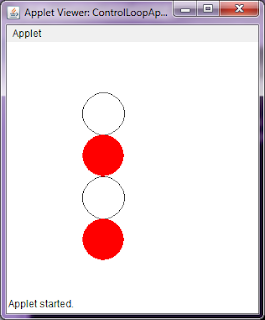
Program to use control loops in Applets

Image
Here, we have shown four circle one below other using "for" loop with two different colors. The methods used are  drawOval( ) ,  fillOval( )  and  setColor( ) . Details of these methods are given in previous programs. PROGRAM import java.awt.*; import java.applet.*; public class ControlLoopApplet extends Applet { public void paint(Graphics g) { for(int i=1;i<=4;i++) { if(i%2==0) { g.fillOval(90,i*50+10,50,50); g.setColor(Color.black); } else { g.drawOval(90,i*50+10,50,50); g.setColor(Color.red); } } } } /* <applet code=ControlLoopApplet width=300 height=300> </applet> */ OUTPUT C:\>javac ControlLoopApplet.java C:\>appletviewer ControlLoopApplet.java

Program to set background and foreground color of an Applet

Image
To set the background and foreground color of an applet  setBackground(Color c)  and  setForeground(Color c)  methods are used respectively. You have to use these methods in applet's  init( )  method. The output of program is shown in OUTPUT section. PROGRAM import java.applet.Applet; import java.awt.Color; import java.awt.Graphics; public class SetBackColor extends Applet { public void init() { setBackground(Color.cyan); setForeground(Color.red); } public void paint(Graphics g) { g.drawString("Hello Java",50,50); } } /* <applet code="SetBackColor" width=200 height=200> </applet> */ OUTPUT C:\>javac SetBackColor.java C:\>appletviewer SetBackColor.java

Program to create an applet to accept a username as parameter and display number of characters.

Image
In this program, we have to get the username from Applet's <PARAM> tag and display the length of the string. The value of parameter can be get using  getParameter( )  method of applet. The  length( ) function is used to find length of given string. PROGRAM import java.applet.Applet; import java.awt.Graphics; public class CharCountParam extends Applet{ String uname="", msg; int length; public void init() { uname = getParameter("Username"); length = uname.length(); uname = "Hello " + uname; msg = "Length = " + length; } public void paint(Graphics g) { g.drawString(uname,50,50); g.drawString(msg, 50, 90); } } /* <applet code="CharCountParam" width=200 height=200> <param name="Username" value="RAHUL"> </applet> */ OUTPUT   C:\>javac CharCountParam.java  C:\>appletviewer CharCountParam.java